
It’s a familiar scenario: You’re peering at your computer screen mid-afternoon, shifting uncomfortably as a dull ache creeps from your neck into your upper back. With screens now essential at work and home, computer neck pain has become a common, daily obstacle for many in Gig Harbor and beyond. If you’re stuck in front of a monitor from sunrise to sunset, you’re not alone—and there’s real hope for relief, especially with holistic and natural care. This guide will walk you through why tech neck happens, its hidden effects, and expert tips for finding natural, lasting solutions right here near Gig Harbor, Washington.
Why Computer Neck Pain Is a Modern Epidemic
More than ever, people spend long periods at their computers, often without moving, leading to what’s now called a “tech neck epidemic. ” Unlike occasional discomfort, computer neck pain is a persistent and growing problem among office workers and remote employees alike. Prolonged screen time creates sustained tension on your neck and upper back, disturbing posture, and increasing the risk of chronic symptoms. Even brief lapses in ergonomic awareness can lead to muscle strain, joint stiffness, and nerve pressure, triggering a cycle of pain that can interfere with work and daily life.
What makes this truly a modern epidemic is the widespread reliance on electronic devices—not just desktops, but also laptops, tablets, and smartphones. The average adult’s workday involves hours of looking downward or forward, often with the head jutting out from the spine. This position puts undue strain on your neck muscles and upper back, causing a ripple effect that may even reach the shoulders or lower back. Given the explosion in remote work, it’s no wonder more people are searching for natural, holistic ways to break this painful cycle.
Recognizing Computer Neck Pain: Real-Life Scenarios
Picture this: You finish a video call, roll your shoulders, and realize your neck feels stiff or sore. Maybe you notice tension spreading from your neck to your shoulder blade after working on a spreadsheet, or an ache that travels down your spine after hours at a poorly positioned desk. These are classic signs of computer neck pain and tech neck symptoms—discomfort that persists long after shutting down your device. If you find yourself rubbing your neck, shifting posture, or dealing with daily headaches and fatigue, the root cause might be your office or home workstation.
Another scenario: You work from home in a cozy nook, not realizing your monitor is too low or your chair lacks lumbar support. By evening, a dull ache radiates from the back of your head to your neck and upper back. This discomfort isn’t just “part of getting older”—it’s a signal that your body is struggling with the physical demands of modern desk work. Those who feel persistent or recurring pain from their neck and shoulders to their upper back could benefit greatly from gentle, holistic interventions.

How Computer Neck Pain Develops in Office and Remote Workers
The onset of computer neck pain often sneaks up on those who spend long hours at a desk—whether in a busy office or a home workspace. Initially, many dismiss mild soreness or fatigue in the neck and upper back as temporary. But as weeks pass, poor posture and lack of regular movement lead to muscular imbalances and joint stiffness. In office settings, fixed positions for screens and rigid schedules mean workers have fewer chances to stretch or change position, compounding the physical strain. The pressure builds gradually, ultimately resulting in both acute symptoms and chronic discomfort.
Remote workers aren’t immune—in fact, makeshift workspace set-ups can be worse for your neck and back. Dining tables or sofas may feel comfortable at first but rarely support healthy alignment. Without frequent breaks and ergonomic adjustments, it’s easy for neck muscles and upper back muscles to grow tense and weak. Ultimately, both office and home-bound professionals are at risk for tech neck, highlighting the urgent need for proactive, natural solutions to combat these modern work habits.
While addressing neck pain is crucial, it's also important to recognize how interconnected our bodies are—tightness and discomfort in one area can often influence others. For those experiencing tension beyond the neck, exploring gentle practices like Yin Yoga for sore hips can complement your holistic approach and support overall mobility.
What You’ll Learn About Computer Neck Pain and Natural Relief
- The root causes of computer neck pain
- Holistic approaches to prevention
- Natural and gentle techniques for relief
- Expert tips for choosing a practitioner in Gig Harbor, WA
Tech Neck and Neck Pain: Unpacking the Science and Symptoms
Science now confirms that “tech neck”—the modern label for computer neck pain caused by prolonged screen habits—affects more than just posture. It’s a cycle of tension, inflammation, and muscular fatigue that builds over months or years of electronic device use. This pain most often appears in the neck and upper back, but can radiate downward, causing **shoulder blade** soreness and even headaches. Recognizing the symptoms early and understanding why they occur is the first step towards lasting relief.
Symptoms may include localized neck ache, twinges that extend to the upper back or shoulders, and odd sensations like tingling or numbness, especially after long work sessions. Many report pain intensifying at the end of a busy day, improved only temporarily by rest or over-the-counter remedies. The reality: lasting recovery requires addressing both the physical and environmental roots of your discomfort, something holistic options specialize in.
Understanding Tech Neck: The Strain of Modern Devices
Tech neck describes the unique strain your body experiences from hours staring at screens. When your head tips forward to view a device, it significantly increases the load on neck muscles, sometimes by several times its natural weight. Over time, this forward-leaning posture causes cumulative damage, weakening neck and upper back support structures. The longer people spend in these positions—especially without regular movement—the greater their risk for pain and long-term injury.
Frequent users of laptops, tablets, and smartphones face the greatest strain on your neck, made worse by scrolling, typing, and holding devices below eye level. Over time, tech neck symptoms become more than muscle pain—they may include stiffness, headaches, decreased range of motion, and pain radiating into the shoulders or back. Awareness is critical: recognizing uneven muscle tension, difficulty turning the head, or tightness that remains even after rest all point back to device use and how you hold your body throughout the day.

Neck Pain Symptoms and When to Seek Help
Everyday neck pain symptoms can start subtly—mild stiffness or soreness after working on a computer, discomfort when turning your head, or tightness connecting the neck and shoulders. However, the warning signs of a growing problem include persistent aching, sharp pain during movement, numbness, or headaches. If pain disrupts your sleep, refuses to improve after a few days of ergonomic adjustments, or is accompanied by arm tingling and weakness, it’s critical to consult a professional or holistic practitioner.
Sometimes the issue might be neck tendonitis, a condition caused by repetitive movements and poor posture. The symptoms can range from tenderness near the base of the skull to sharp pain with movement. Prolonged symptoms, especially those that do not respond to self-care, indicate the need for assessment and possibly intervention from a physical therapist or holistic expert. Early attention prevents minor muscular aches from developing into chronic, life-limiting back and neck pain.
Comparing Computer-Related Neck and Back Pain
Computer-related musculoskeletal pain isn’t limited to the neck—upper back and sometimes lower back discomfort frequently follow. Poor posture, repetitive tension, and static positions at your workstation create muscular imbalances from the neck down. If you notice pain radiates from the base of your skull through your back muscles, into your shoulders, or even towards your lower back, the issue likely involves both neck and back mechanics.
Comparing neck vs. back pain reveals overlapping causes: long periods in one position, inadequate lumbar support, and ignoring the warning signs of stiffness and soreness. Both types of pain benefit from comprehensive, holistic treatment plans that address ergonomics, gentle movement, and stress reduction. Understanding that neck and upper back pain are deeply linked can inform the best strategies for lasting relief.
Key Causes of Computer Neck Pain
Pinpointing the root causes of computer neck pain is the key to effective prevention and healing. The leading contributors include poor desk ergonomics, inadequate monitor height, postural habits that place excess strain on the neck and back, and extended periods of screen time without breaks. Each of these factors not only affects the neck directly but also influences the back and shoulders, creating complex patterns of discomfort that can be challenging to resolve without holistic guidance.
Environmentally, home workstations are often not optimized for healthy posture, while office set-ups may lack flexibility for individual needs. The interplay of workplace stress, habitually sedentary behavior, and improper alignment make it all the more necessary to explore solutions that go beyond symptom relief and address the body as a whole.
Eye Level and Ergonomics: How Your Setup Contributes to Tech Neck
A major culprit in computer neck pain is keeping screens below eye level. When the monitor is too low or far away, users instinctively slump forward or crane their necks, increasing the load on upper back, neck, and shoulder muscles. Over time, this seemingly minor misalignment leads to chronic tension, joint discomfort, and the much-talked-about tech neck symptoms. Ensuring your monitor is at eye level, directly in front of you, forms the foundation for neck and back health.
Adjusting monitor height, using document holders, and placing keyboards so that elbows rest comfortably are ergonomic basics that prevent unnecessary strain on your neck. Proper ergonomics isn’t just about comfort—it’s about long-term health for everyone from busy professionals to remote workers. Simple changes made today can prevent a lifetime of neck and back pain.
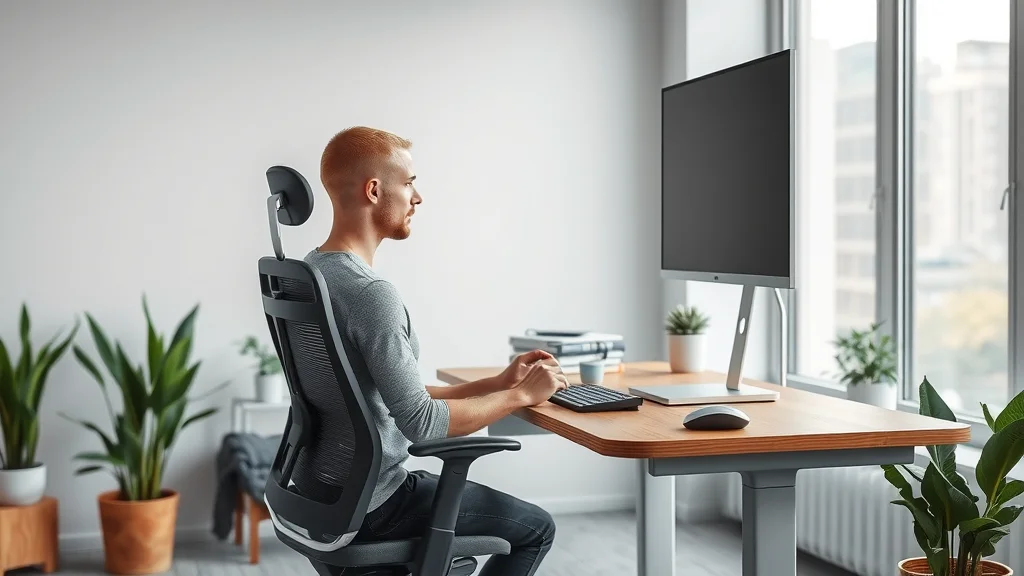
Poor Posture and Muscular Imbalances Impacting the Neck and Back
Slouching, rounded shoulders, and habitual forward head posture are significant factors in developing computer neck pain. Repetitive misuse of neck muscles and upper back muscles—often unnoticed for hours—result in muscular imbalance. Some muscles grow weak while others become overactive and tight, creating discomfort that’s difficult to target with stretching alone. Poor posture isn’t just a cosmetic issue; it can fundamentally alter the structure and health of the spine.
Over time, these imbalances can impact everything from balance to breathing to your body’s ability to recover from daily stresses. Left unchecked, poor posture can trigger headaches, limited neck and back mobility, and even problems with shoulder blade positioning. Recognizing the connection between posture and persistent neck or back pain is the first step toward genuine healing.
The Role of Stress and Sedentary Behavior in Neck Pain
Modern work doesn’t just strain the body—it stresses the mind. Mental pressures build muscle tension, causing us to hunch our shoulders or clench our neck and upper back, amplifying any discomfort from poor ergonomics. Chronic stress is well recognized as a driver of muscle pain, stiffness, and even inflammatory symptoms linked with tech neck.
Compounding this, a lack of regular movement—“long periods” spent sitting motionless—limits blood supply, reduces the body’s ability to remove metabolic waste, and slows healing. Sedentary routines common in tech and remote work put the neck and back at risk, making holistic strategies to reduce stress and enhance regular movement extremely valuable in both relief and prevention.
Natural and Holistic Solutions for Computer Neck Pain
If you’re frustrated by recurring computer neck pain, holistic modalities can offer profound relief and long-term prevention. Natural techniques focus on gentle movement, postural awareness, and therapies that address body, mind, and environment together. Rather than just masking pain, holistic solutions aim for true healing—supporting the entire back and neck complex and restoring harmony to movement patterns.
Gentle stretches, physical therapy, yoga, massage, breathwork, and tailored desk adjustments are just some examples of natural interventions that offer both immediate and sustained comfort. Finding the right blend of these options—and expert guidance here in Gig Harbor—can transform nagging neck or back discomfort into a source of health and vitality.
Gentle Movements: Stretches and Exercises for Neck and Upper Back
Daily movement is essential for preventing and healing computer neck pain. Simple neck stretches, chin tucks, and gentle shoulder rolls can relax tense muscles and restore normal range of motion. For instance, try the following: While seated, drop your right ear toward your right shoulder and hold for 20 seconds, repeating on each side. Incorporating these exercises several times a day counteracts the effects of static desk work and keeps neck and upper back muscles strong and flexible.
You can also include gentle upper back extensions and scapular retraction exercises—which pull the shoulder blades back and down—to rebalance posture ruined by hours of screen use. Remember, the goal is consistency: even short, mindful movement breaks promote circulation, allow muscles to recover, and prevent chronic injury. Working with a holistic practitioner or physical therapist ensures these stretches are tailored to your specific needs and safe for any existing conditions.
“In my years practicing holistic health, gentle daily mobility has been truly transformative for clients suffering from tech neck.” – Local Practitioner
The Benefits of Physical Therapy and Alternative Therapies for Tech Neck
Working with a physical therapist or holistic professional in Gig Harbor provides access to personalized exercise programs, hands-on bodywork, and expert ergonomic advice. Physical therapy specifically for tech neck can restore mobility, ease pain, and rebuild muscular balance, while alternative therapies such as massage, acupuncture, or yoga encourage deep relaxation and nervous system resilience.
Additionally, these interventions take into account the emotional toll of recurring back and neck pain, teaching mindfulness and self-care habits that can prevent relapse. Many clients report not just reduced pain but also improved energy and mental clarity, thanks to this whole-body approach. If you’re searching for lasting relief beyond short-term fixes, holistic care offers an effective, natural path to wellness.

Ergonomic Tips to Prevent Computer Neck Pain
Establishing a healthy workstation is your best defense against computer neck pain. These changes don’t require expensive office equipment—small, strategic adjustments can make all the difference for neck, upper back, and shoulder comfort. Think of ergonomics as the practical application of self-care: each improvement lessens muscular strain, aligns joints, and helps prevent the onset of tech neck symptoms.
Ergonomic upgrades might include setting your screen at the correct height, investing in a supportive chair, using a split keyboard to maintain wrist neutrality, and keeping the mouse close at hand. Most importantly, don’t forget movement. Even the best desk setup won’t help if you remain static for hours—changing position frequently, taking brief standing breaks, and practicing gentle stretches are just as vital.
Setting Your Screen at Eye Level: The Foundation for Neck Health
The simplest and most effective ergonomic fix? Place your monitor so the top third of the screen is level with your eyes and about an arm’s length away. This prevents forward head posture, which is a direct contributor to neck pain and upper back tension. If you work from a laptop, consider a riser or external monitor to achieve eye level, keeping in mind that natural alignment minimizes the risk of both neck and back injury.
Remember: even a well-designed desk can create problems if not properly adjusted. Check your set-up regularly, and don’t hesitate to seek expert guidance from a holistic practitioner for ideas specific to your workspace and body needs.
How a Standing Desk Can Help Alleviate Tech Neck and Neck Pain
Many people have found relief for tech neck and computer-related neck and back pain by using a standing desk. Transitioning between seated and standing positions throughout the day encourages natural movement, relieving prolonged pressure from the neck and upper back. When set up correctly, a standing desk allows you to maintain proper posture, promote circulation, and reduce static tension—key factors in avoiding and reducing discomfort from screen work.
To optimize your standing desk, ensure your monitor is still at eye level and your elbows rest comfortably at a 90-degree angle. Invest in an anti-fatigue mat and take frequent movement breaks, as standing uninterrupted for “long periods” can also cause issues. Holistic practitioners or ergonomic specialists often provide personalized advice for transitioning safely and effectively to a standing desk environment.

Creating Micro-Breaks and Movement Habits to Reduce Neck and Back Strain
While posture is crucial, movement is just as important in preventing computer neck pain. Micro-breaks—short pauses to stretch, walk, or perform quick exercises—help reverse the effects of static desk work. Experts recommend standing, changing position, or doing a simple neck or upper back stretch every 30–60 minutes. These movement habits improve blood flow, reduce muscular stress, and re-energize both body and mind.
Over time, integrating movement into your workday can transform not only your experience of neck and back discomfort but also enhance concentration, creativity, and mood. Set reminders, use apps, or attach sticky notes to develop this vital self-care routine. Holistic practitioners can demonstrate practical micro-break exercises and tailor routines to your unique lifestyle for optimal long-term results.
Holistic Approaches: Mind-Body Techniques for Lasting Relief
Beyond physical adjustments, mind-body practices can be invaluable in reducing and preventing computer neck pain. Techniques such as breathwork, mindfulness meditation, and guided relaxation encourage the release of chronic muscle tension, especially in the neck, upper back, and shoulders. Practicing awareness of your body’s signals—like tensing your shoulders or clenching your jaw—allows for immediate correction, fostering lasting resilience against stress-induced discomfort.
Regular relaxation reduces stress hormones, boosts immune health, and enhances the effects of other therapies. Consider adding short guided breathing sessions or meditation to your morning or workday routine. Even five minutes of intentional deep breathing can dramatically reduce the accumulation of stress-related neck and back pain.
Breathing Practices, Mindfulness, and Stress Reduction for Back and Neck Pain
For many, neck and back pain is as much emotional as physical. Mindfulness-based practices help bring awareness to tension patterns, allowing earlier and more effective intervention. Simple breathing exercises—like abdominal breathing or alternate nostril breathing—relax the nervous system and support tissue healing. You might also try brief daily body scans to notice and release unnecessary tension throughout the back, neck, and shoulders.
Adding stress management techniques to your holistic regimen can improve not only pain but also sleep, mood, and focus, accelerating recovery and preventing relapses of tech neck symptoms. Holistic practitioners often teach these methods alongside physical therapies to address pain from every angle.
The Importance of Sleep for Neck and Back Healing
Quality sleep is essential for your body to restore and repair tissues stressed by long periods of desk work. Your neck and upper back need time to recover from the micro-strains of daily tasks, especially after repetitive screen use. Holistic practitioners may offer guidance on optimizing sleep posture—using supportive pillows, maintaining a neutral spine, and avoiding positions that place excess pressure on the neck.
If you wake with stiffness or pain, reviewing both sleep position and mattress quality is a wise step. Combined with holistic therapies, improved sleep creates a foundation for sustainable neck and back health, accelerating healing and supporting overall vitality.
Choosing a Holistic Practitioner for Computer Neck Pain in Gig Harbor, WA
If you’re ready for lasting, natural solutions to computer neck pain, the right holistic practitioner makes all the difference. Gig Harbor offers a range of professionals specializing in gentle, root-cause care tailored to tech neck, upper back pain, and postural dysfunction. The most effective practitioners blend hands-on expertise with advanced knowledge of ergonomic and mind-body strategies.
Seek out practitioners who take the time to understand your unique story, assess your workstation, and teach self-care skills you can implement daily. Word of mouth, local reviews, and direct consultation are excellent ways to find your perfect fit, ensuring you receive top-tier care just minutes from home.
What to Look for in a Neck and Back Expert
- Hands-on experience with tech neck and upper back pain
- Holistic, natural approach focusing on root causes
- Reviews and expertise in ergonomic adjustments
- Proximity to Gig Harbor for in-person support
Questions to Ask When Booking Your First Appointment
Before scheduling a visit, ask potential practitioners about their specific experience treating computer neck pain, whether they offer ergonomic assessments, and how they tailor natural therapies for tech neck symptoms. Inquire about ongoing support—can they provide movement plans, teach at-home exercises, and help with workspace adjustments? Understanding their philosophy, communication style, and range of techniques ensures you get truly personalized care, empowering you to make confident decisions for long-term neck and back health.
Don’t hesitate to ask about their approach to collaboration with other healthcare or medical center professionals, should more advanced intervention be needed. This way, you ensure a seamless integration of holistic and conventional care—setting you on the path to lasting relief.
Watch a concise video demonstration of safe neck and upper back stretches—perfect for office or home use. The routine features a skilled practitioner guiding viewers through both seated and standing positions, emphasizing gentle form, controlled breathing, and mindful movement cues. These evidence-based stretches support ergonomic health and provide immediate comfort, empowering you to integrate natural movement into your daily work routine.
This instructional video explains how to transform your workspace for optimal neck and back wellbeing. Step-by-step visuals illustrate monitor placement, chair and desk height, keyboard positioning, and movement strategies—building a strong ergonomic foundation to prevent tech neck and chronic pain from prolonged screen time.
Table: Quick Reference – Computer Neck Pain Symptoms vs. Other Neck and Back Disorders
| Condition | Main Symptoms | Typical Causes | When to Seek Help |
|---|---|---|---|
| Computer Neck Pain / Tech Neck | Dull or sharp neck ache, stiffness, radiating upper back pain, occasional headaches | Prolonged screen use, poor ergonomics, forward head posture | If pain persists beyond 1 week, disrupts sleep, or limits daily activity |
| Neck Tendonitis | Tenderness, aching, or sharp pain during movement, swelling | Repetitive strain, improper desk setup | Persistent or worsening symptoms after self-care |
| Cervical Disc Issues | Numbness, tingling, weakness in arms, severe neck and back pain | Prolonged strain, injury, degenerative changes | Immediately if limbs are affected or pain is severe |
| Muscle Strain / Sprain | Localized soreness, possible swelling, usually follows unusual activity or sudden movement | Physical overexertion, awkward lifting, abrupt posture changes | If not improving after several days, or worsens with normal use |
People Also Ask: Answers to Common Questions About Computer Neck Pain
What is the fastest way to cure a stiff neck?
Answer: Gentle stretching, heat therapy, and immediate posture correction are key first steps for computer neck pain. Holistic practitioners may also recommend soft tissue massage and breathwork for immediate relief. Always start with gentle range-of-motion exercises, and avoid sudden or aggressive movements to prevent further strain on your neck or back.
What are the symptoms of neck tendonitis?
Answer: Neck tendonitis often presents with persistent tenderness, aching, or sharp pain during movement, typically linked with repetitive strain from prolonged computer use. Swelling or warmth may occur over the affected area, and discomfort is usually aggravated by head or neck activity.
Will Tech Neck go away?
Answer: With consistent ergonomic adjustments, movement breaks, and holistic therapy, tech neck can significantly improve—and often resolve—over time under professional guidance. Addressing root causes and adopting new habits is crucial for sustainable recovery and prevention.
How long does a stiff neck last?
Answer: Most stiff necks related to computer neck pain resolve within a few days to a week with self-care, but chronic symptoms may persist without posture and lifestyle changes. Holistically addressing ergonomics, regular movement, and stress reduction helps prevent recurrence and supports long-term neck health.
Comprehensive FAQs: Computer Neck Pain
- Can changing my chair help with computer neck pain?
- Is yoga effective for neck and back pain from computers?
- When should I consult a medical or holistic practitioner?
- What role do hydration and nutrition play in reducing neck pain?
Key Takeaways for Managing Computer Neck Pain Naturally
- Awareness and ergonomics are immediate, effective solutions.
- Natural, hands-on therapies support lasting relief from tech neck.
- Choosing the right practitioner in Gig Harbor leads to healthier, pain-free living.
Begin Your Journey to a Pain-Free Neck: Schedule a Consultation with a Qualified Holistic Practitioner in Gig Harbor
Don’t let computer neck pain control your life. Start your path to recovery by booking an appointment with a holistic practitioner near Gig Harbor. Expert, natural care is within reach—take the first step today.
If you’re inspired to take your healing journey further, consider how holistic movement practices can enhance your overall well-being. Approaches like Yin Yoga not only target specific areas such as the hips but also foster a deeper sense of balance and flexibility throughout the body. By integrating mindful movement into your routine, you can address the root causes of discomfort and support long-term resilience against daily stresses. Discover how embracing healing movement in Gig Harbor can be a transformative next step by exploring the benefits of Yin Yoga for sore hips and holistic health.







Write A Comment